- Published on
How I Built My AI-Powered Engineering Workflow
- Authors

- Name
- Do Quang Huy
How I Built My AI-Powered Engineering Workflow
Planning with Claude, researching with NotebookLM, coding with Codex — and why Obsidian holds it all together. Powered by the Superpowers agentic skills framework.
Category: AI Workflow · Developer Tools · Productivity
Reading time: ~8 min
The problem with one-size-fits-all AI
Engineering used to mean switching between ten tabs, forgetting half the context by the time you got to writing code, and doing the same research for the third time because you didn't write it down anywhere that made sense. That's no longer my reality. Over the past year I've assembled a small but powerful stack of AI tools — each with a clear role — that collectively turn a vague feature idea into running code with far less friction.
This isn't about replacing thinking. It's about offloading the right parts of it so you can think about what actually matters.
The stack at a glance
| Tool | Tier | Role |
|---|---|---|
| Superpowers | Open source | Agentic skills framework & software development methodology |
| Claude | Pro | Planning, architecture, high-level reasoning, and orchestration hub |
| ChatGPT | Plus | Secondary reasoning, cross-validation, and ideation |
| Obsidian | Free / community | Note-taking, second brain, persistent context store |
| Google NotebookLM | Gemini Pro (1 month free) | Deep research and feature decomposition |
| Google Stitch | Gemini Pro (1 month free) | AI-generated UI mockups via MCP |
| Excalidraw MCP | Free | Quick flow diagrams embedded in architecture notes |
| draw.io MCP | Free | Formal architecture diagrams for technical documents |
| GitHub Copilot | Enterprise | Inline code completion and implementation assistance |
| OpenAI Codex | ChatGPT Plus | Heavier code generation and scaffolding |
A note on subscriptions — the real cost of this workflow
Let's be upfront: this stack is not free. Here's what I'm running and why each tier is worth it.
Claude Pro is non-negotiable for this kind of work. The planning and orchestration phase is token-intensive by nature — you're feeding in research outputs, architectural context, Obsidian notes retrieved via MCP, and iterating on complex designs across long sessions. The free tier hits limits fast. Claude Pro gives you the throughput to actually sustain an agentic workflow without constantly rationing context.
ChatGPT Plus earns its place as a second opinion and ideation layer. When you're deep in a problem, having a different model with a different reasoning style cross-validate your architecture or suggest alternatives you hadn't considered is genuinely valuable. ChatGPT Plus also gives access to o1 and o3 for reasoning-heavy tasks where you want to slow down and think carefully. The Plus tier also unlocks OpenAI Codex for heavier code generation and scaffolding tasks — so one subscription covers both the reasoning and the implementation layer.
Gemini Pro via Google One — I'm currently on the free promotional month that comes bundled with Google One. NotebookLM's deep research capabilities are powered by Gemini, and the Pro tier unlocks higher source limits, longer context, and priority access. Worth evaluating after the trial whether the paid tier makes sense depending on how heavily you use NotebookLM.
GitHub Copilot Enterprise integrates at the organization level and brings capabilities that the individual plan doesn't: custom model fine-tuning on your codebase, Copilot Chat with awareness of your entire repo, and admin controls for team usage. For professional engineering work where you want Copilot to understand your team's conventions and internal libraries, the Enterprise tier is a meaningful step up.
The combined monthly cost of this stack is real. But measured against the time saved and the quality improvement in architectural decisions and implementation, it's one of the more defensible line items in a professional development budget.
The foundation — Superpowers agentic skills framework
Everything in this workflow is built on top of obra/superpowers — an open-source agentic skills framework and software development methodology. With 137k stars on GitHub, it's the scaffolding that makes the whole system coherent.
Superpowers provides a structured way to define skills, agents, hooks, and commands that Claude and other AI agents can invoke. Rather than ad-hoc prompting, you get a repeatable methodology: skills live in version-controlled files, agents have defined responsibilities, and the workflow becomes something you can iterate and improve over time — not just a clever chat session.
The framework supports Claude Code, Codex, and Cursor out of the box, which means the same skill definitions power whichever AI coding tool you're using at any given moment.
The workflow in three phases
Research (NotebookLM) → Plan + Orchestrate (Claude + Obsidian) → Build (Codex + Copilot)
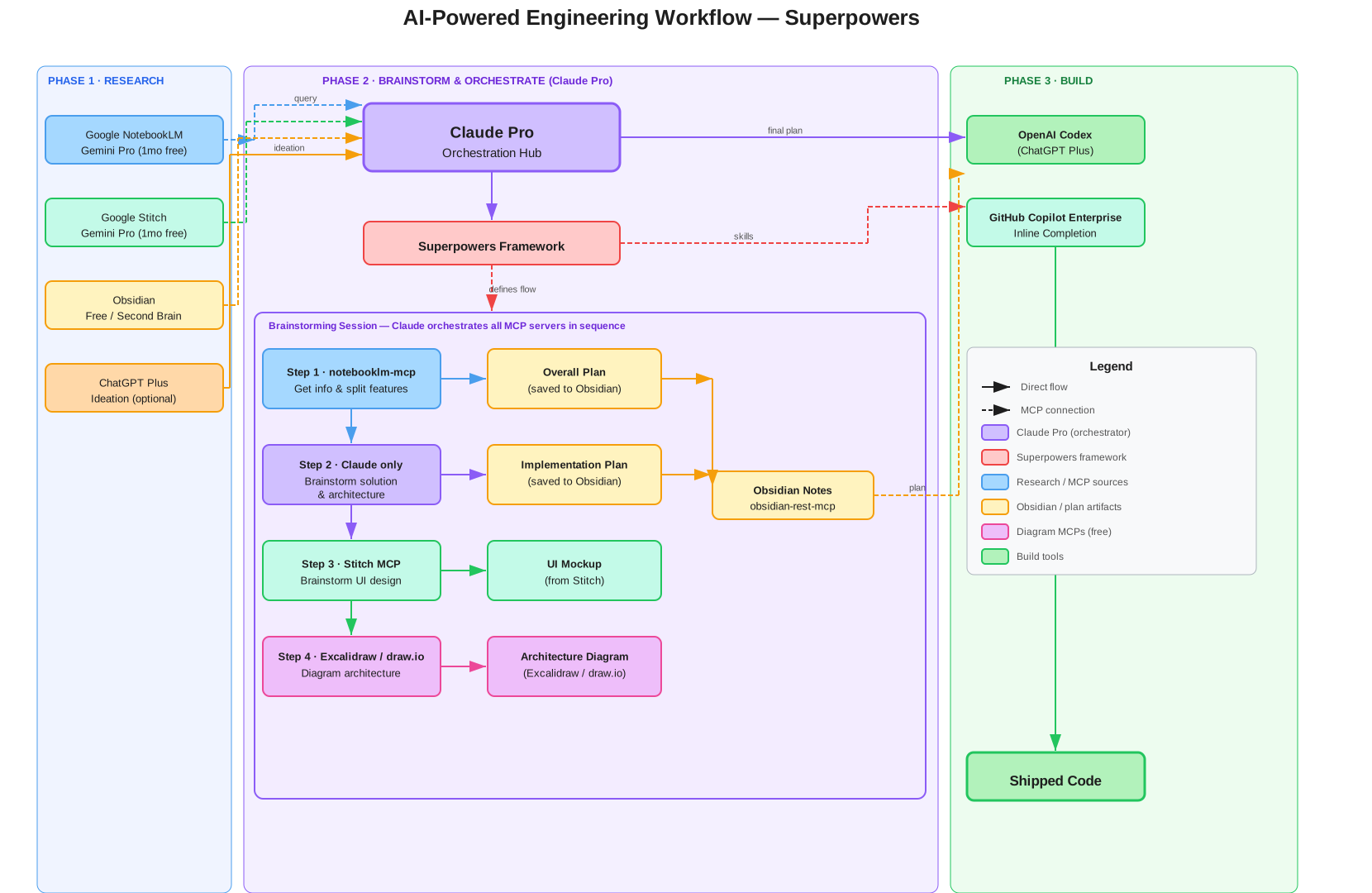
Phase 1 — Deep research with Google NotebookLM
Before writing a line of code or a single design decision, I feed the problem into Google NotebookLM. NotebookLM is exceptional for a specific task that other tools handle poorly: breaking down a large, fuzzy feature into its constituent parts. I'll upload relevant documents — API specs, previous design docs, reference materials — and use NotebookLM's AI to interrogate them, surface contradictions, and generate structured breakdowns.
The result isn't just a summary. It's a proper decomposition: what does this feature actually need? What are the edge cases? What are the integration points? Where are the unknowns? This deep-research phase is where the problem goes from intimidating to tractable.
"NotebookLM doesn't just summarize — it lets you interrogate your source material. That changes how you approach a problem entirely."
Phase 2 — Claude as the orchestration hub: the brainstorming session
This is where the workflow gets interesting — and where Claude earns a role that goes well beyond "AI assistant." The centrepiece of Phase 2 is a structured brainstorming session in which Claude, running on the Superpowers framework, orchestrates every MCP server in sequence to move from a raw feature idea to a complete, documented plan.
The session runs in four steps.
Step 1 — Feature decomposition via notebooklm-mcp
Claude's first action in any brainstorming session is to query Google NotebookLM via notebooklm-mcp. It pulls the relevant research notebooks — specs, previous design decisions, reference docs — and uses them to decompose the feature into its constituent parts: what needs to be built, what the integration points are, where the edge cases lie, and what the unknowns are.
This gives Claude a grounded, citation-backed breakdown to reason from rather than a blank slate. The output of this step is a structured feature split saved directly to Obsidian as the starting point of the Overall Plan.
Step 2 — Brainstorm solutions and architecture
With the feature decomposed, Claude reasons through the solution space: what architectural patterns apply, what the data flow looks like, how services interact, and what the sequencing should be. This is pure Claude orchestration — drawing on the feature split from Step 1, the context pulled from Obsidian via obsidian-rest-mcp, and its own reasoning to produce a coherent solution design.
The output of this step is the Implementation Plan, saved to Obsidian.
Step 3 — UI brainstorming via Stitch MCP
Once the solution architecture is clear, Claude connects to Google Stitch via MCP to brainstorm the UI. Rather than describing the interface in prose and switching to a separate design tool, Claude triggers Stitch mid-session and iterates on UI mockups as part of the same conversation. The resulting designs are captured as the UI Mockup artifact and linked into the Obsidian plan.
This keeps design thinking inside the orchestration loop — the UI is shaped by the same context as the architecture, not designed in isolation afterward.
Step 4 — Architecture diagrams via Excalidraw MCP + draw.io MCP
The final brainstorming step is to visualise the architecture. Claude connects to the Excalidraw MCP for quick flow diagrams and system sketches, and the draw.io MCP for formal architecture documents intended for wider engineering audiences. Both are embedded directly into the Obsidian architecture note, so the written plan and its visual representation live together.
The output: a complete plan in Obsidian
By the end of the brainstorming session, four artifacts exist in Obsidian, created without ever leaving Claude:
- Overall Plan — what is being built and why
- Implementation Plan — how it will be built, step by step
- UI Mockup — what it will look like (from Stitch)
- Architecture Diagram — how the components connect (from Excalidraw / draw.io)
These become the persistent context that feeds Phase 3. Codex and Copilot Enterprise don't receive vague instructions — they receive a complete, documented plan.
"The brainstorming session is where the magic happens. Claude isn't just reasoning — it's actively pulling research, generating designs, and producing diagrams, all in one orchestrated flow."
Claude connects everything via MCP
Claude sits at the center of the workflow not just as a reasoning tool, but as an active orchestrator that connects directly to the other tools through Model Context Protocol (MCP) servers. Two integrations are what make this genuinely powerful:
Obsidian MCP — obsidian-rest-mcp
Repo: AlexW00/obsidian-rest-mcp
This MCP server wraps the Obsidian Local REST API, exposing your entire vault to Claude as a queryable knowledge base. Once set up, Claude can:
- Search and retrieve notes from your Obsidian vault in real time
- Pull previous architectural decisions, meeting notes, or planning outputs directly into its context
- Read and write notes without you ever leaving the Claude session
The setup involves installing the Obsidian Local REST API plugin in Obsidian, then pointing obsidian-rest-mcp at it. Claude then talks to your local Obsidian instance over that REST interface. Your vault stays local — nothing is sent to a third-party server.
The practical result: Claude doesn't start sessions cold. It can look up "what did I decide about the auth flow last sprint?" and get a real answer from your actual notes — not a hallucinated one.
NotebookLM MCP — notebooklm-mcp
Repo: PleasePrompto/notebooklm-mcp
This MCP server lets Claude (and other AI agents like Codex) query your NotebookLM notebooks directly — with grounded, citation-backed answers from Gemini. The key capabilities:
- Zero hallucinations — answers are grounded in your actual source documents
- Persistent auth — stays authenticated across sessions
- Library management — Claude can list and query across multiple notebooks
- Cross-client sharing — the same notebooks are accessible from Claude Code, Codex, or wherever else you're working
This closes the loop between research and planning. Instead of copy-pasting outputs from NotebookLM into Claude manually, Claude fetches the information it needs mid-session, cites where it came from, and incorporates it into its reasoning in real time.
Google Stitch MCP — UI mockup generation
Docs: stitch.withgoogle.com/docs/mcp/setup
When a feature involves a new UI, I connect Claude to Google Stitch via MCP to generate UI mockups without leaving the planning session. Stitch is Google's AI-powered UI design tool, and the MCP integration means Claude can trigger mockup generation directly — describing a component or screen and getting a rendered design back as part of the planning conversation.
This keeps the design phase inside the same orchestration loop. Instead of switching to a separate design tool, describing the requirement again from scratch, and copy-pasting outputs back, the mockup becomes another artifact that Claude produces and stores to Obsidian alongside the architectural notes.
Excalidraw MCP + draw.io MCP — diagrams in architecture documents
When writing up architecture documentation in Obsidian, I often need more than text — I need a diagram. Claude connects to both the Excalidraw MCP and the draw.io MCP to generate diagrams directly as part of the note-writing process.
The pattern is straightforward: Claude is drafting an architecture note, reaches a point where a system diagram would make the design clearer, calls the diagram MCP, and embeds the result into the Obsidian note. No context switch, no separate diagramming session, no manual re-description of what you just designed in the planning conversation.
Excalidraw works well for quick, informal flow diagrams and system sketches. draw.io handles more formal architecture documents where precise layout and notation matter — the kind of diagram you'd include in a technical design document or share with a wider engineering audience.
"The MCP integrations turn Claude from a smart chat window into a genuine workflow hub. It's not just reasoning about your problem — it's actively pulling in the context it needs to do so well."
Obsidian as the second brain
While Claude orchestrates the live session via MCP, Obsidian also functions as the persistent memory layer that outlives any individual conversation. Every important decision, architectural note, and planning output gets written back into Obsidian — either manually or via the MCP connection itself. My vault is organized around projects, with links between planning notes, research outputs, and implementation decisions.
This dual role — live MCP data source and long-term archive — means the vault compounds in value over time. The longer you use it, the more context Claude has access to.
Phase 3 — Implementation with Codex + GitHub Copilot Enterprise
By the time I get to writing code, the hard work is already done. The plan is clear, the architecture is decided, the edge cases are documented in Obsidian. Now OpenAI Codex and GitHub Copilot Enterprise take over.
Codex handles the heavier code-generation tasks — scaffolding new modules, writing boilerplate, translating a spec into a working class. Copilot Enterprise fills in the gaps inline as I write, but it goes beyond individual autocomplete: with Enterprise, Copilot has awareness of the entire repository, understands the team's conventions, and can answer questions about the codebase through Copilot Chat with repo-level context. This is meaningfully different from the individual plan — it's the difference between a smart autocomplete and a coding partner that actually knows the project.
Because both Codex and Claude Code are supported by the Superpowers framework, the skill definitions I've written for Claude also work in Codex sessions. The methodology travels with the task, not the tool.
The critical thing is that implementation is fast here precisely because of what came before. You're not figuring out architecture while writing code. You're executing a decision that was already made and documented.
Why this works: the AI workflow superpower
Each tool in this stack does exactly one thing well, and the brainstorming session is what ties them together:
- Superpowers provides the methodology and skill scaffolding that defines the brainstorming flow
- NotebookLM (Gemini Pro) decomposes features with grounded, citation-backed research — Step 1
- Claude Pro reasons, plans, and orchestrates all MCP servers in sequence across the four brainstorming steps
- ChatGPT Plus is available for ideation and cross-validation outside the brainstorming session; the same subscription covers OpenAI Codex for code generation
- Google Stitch generates UI mockups in Step 3 without breaking the planning session
- Excalidraw MCP + draw.io MCP produce architecture diagrams in Step 4, embedded directly into Obsidian notes
- Obsidian stores the four output artifacts — Overall Plan, Implementation Plan, UI Mockup, Architecture Diagram — that persist beyond any session
- Codex + GitHub Copilot Enterprise execute against that complete documented plan, with repo-level awareness
Trying to do everything with one AI tool creates mush. Using the right tool for each phase of the workflow creates clarity. Research flows into planning, planning flows into Obsidian, Obsidian feeds the implementation session via MCP. Each phase produces an artifact that the next phase can consume.
That's not a workflow — that's a pipeline. And pipelines scale.
"The superpower isn't any single AI tool. It's the deliberate sequencing of the right tools in the right order, with Claude acting as the orchestration layer and a human-authored second brain holding it all together."
Getting started — the minimum viable setup
Install Superpowers — read the README and set up the skills framework in your project. This is the foundation everything else builds on.
Set up Obsidian with a project-based folder structure. Install the Obsidian Local REST API plugin.
Connect obsidian-rest-mcp to Claude Desktop or Claude Code. Claude can now query your vault in real time.
Use NotebookLM for any feature that's genuinely complex — upload specs, docs, and reference material and use it to decompose the problem.
Connect notebooklm-mcp to close the loop. Claude can now query your research notebooks mid-session with citation-backed answers.
Connect Google Stitch MCP to enable UI mockup generation directly from within Claude planning sessions.
Add the Excalidraw MCP and draw.io MCP so Claude can generate flow diagrams and formal architecture diagrams and embed them into Obsidian notes without leaving the session.
Use Codex and Copilot for implementation. With Superpowers installed, your skill definitions travel across both tools.
Final thought
If you're still treating AI as a one-stop shop for everything from Googling to generating entire features, I'd encourage you to try specializing. Give each tool a lane. Let Claude be the brain that connects them via MCP. Build on a methodology like Superpowers that makes the workflow repeatable and improvable. You might be surprised how much faster and clearer everything becomes.